Tampermonkey Automator
A suite of Tampermonkey userscripts that eliminate repetitive manual workflows across three platforms used in clinical research: ClinSpark (trial management), Florence eBinder / Research Binders (electronic document signing), and Microsoft Teams (meeting attendance tracking). Each script injects a floating control panel into the host platform and automates multi-step operations that previously consumed hours of daily staff time. The Florence Automator logic has since been migrated into a standalone Manifest V3 browser extension.
The Problem
Clinical trial platforms require meticulous data entry for every subject visit: vital signs, lab results, eligibility checks, dosing records, and more. Each activity plan can involve dozens of form fields across multiple pages, and a single study day might require processing 20–50 subjects.
- Staff spent 3–5 hours daily on repetitive click-through workflows.
- Manual data entry across multi-page forms introduced transcription errors.
- Calculated fields (BMI, QTcF, blood pressure averages) had to be computed and entered by hand.
- Barcode-based sample tracking required switching between the platform and external systems.
- No built-in batch processing — each subject had to be handled one at a time.
Platform Coverage
ClinSpark Automator
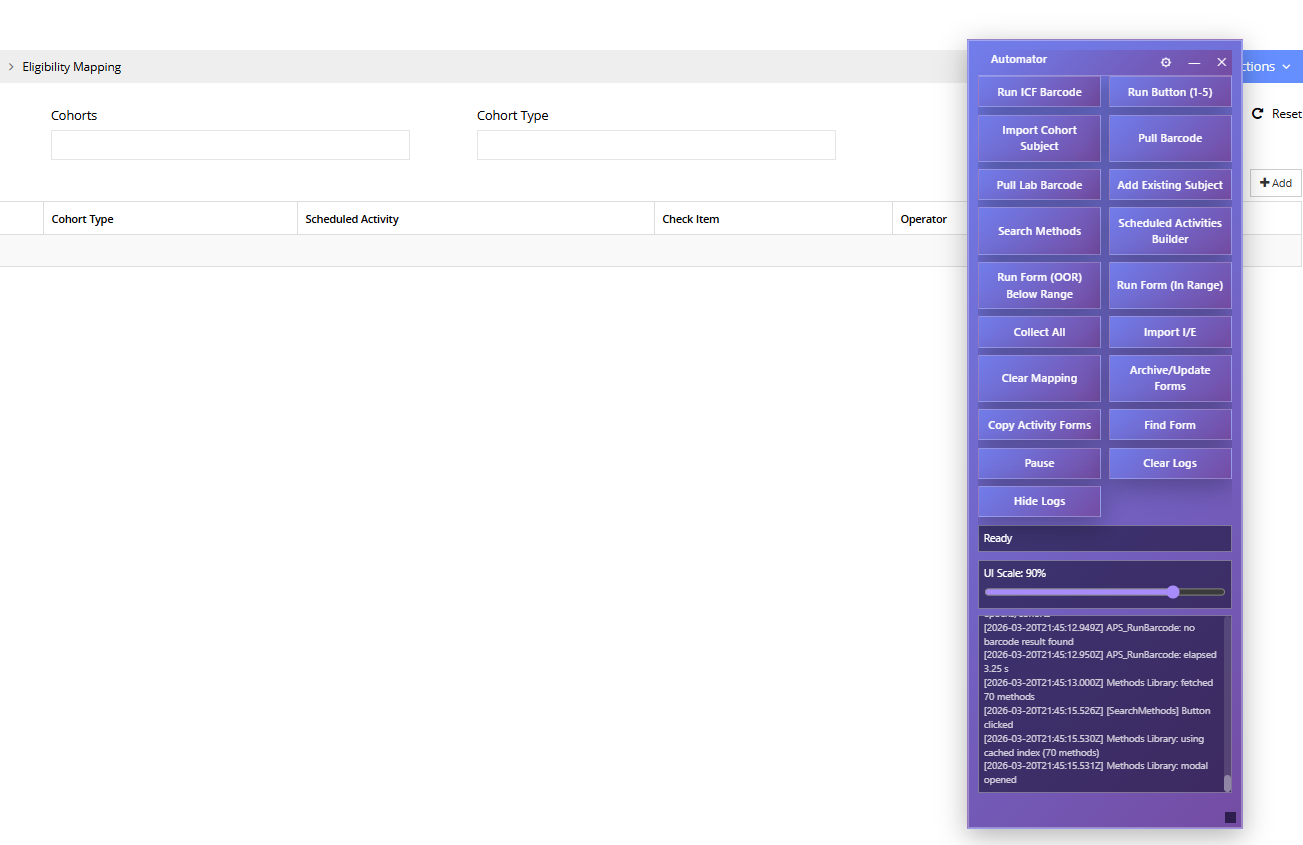
Targets the ClinSpark clinical trial management platform. Multiple specialized scripts handle different workflows:
- Test Automator — full-featured script covering all study workflows (v3.8.7, ~1.9 MB)
- ClinSpark Automator — production deployment covering routine study operations
- Lab Automator — focused on lab sample collection and processing
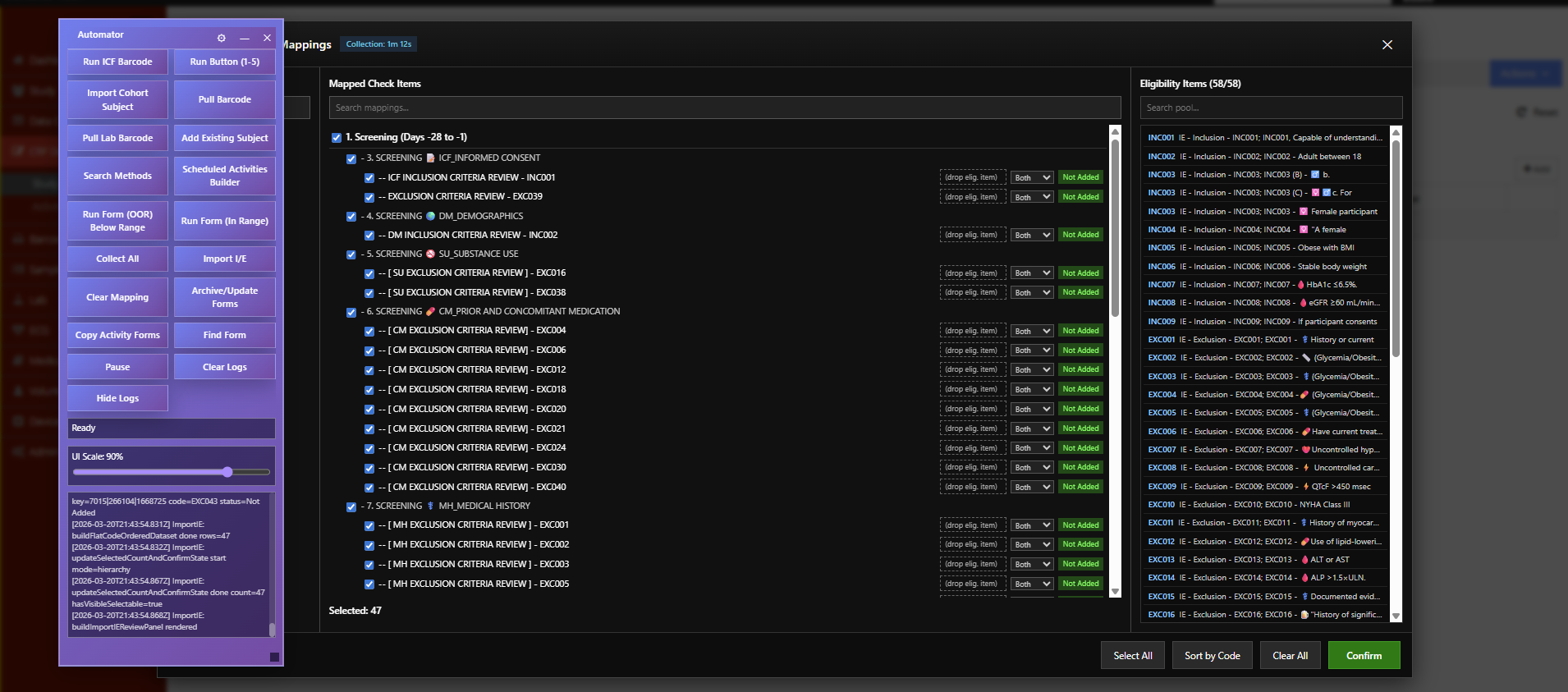
- Admin Automator — study setup, cohort configuration, and eligibility mapping
- Build Procedure — procedure log activity plan builder
- 20+ automated features per script; 85+ documented calculation methods in the shared methods library
Florence Automator
Targets Florence eBinder (researchbinders.com), a clinical document management platform used for electronic log book sign-offs.
- Batch eLog signing: scans all log entries and signs them on behalf of a selected team member
- Handles Angular CDK virtual scroll viewports — progressively scrolls and scans large entry lists
- Status tracking per entry: pending, found, not found, duplicate
- Progress panel with live scan count and stop control
- Robust retry logic for dynamically loaded content and
aria-busystates - Migrated into a Manifest V3 browser extension for managed install/update and Chrome Web Store distribution
Microsoft Teams Automator
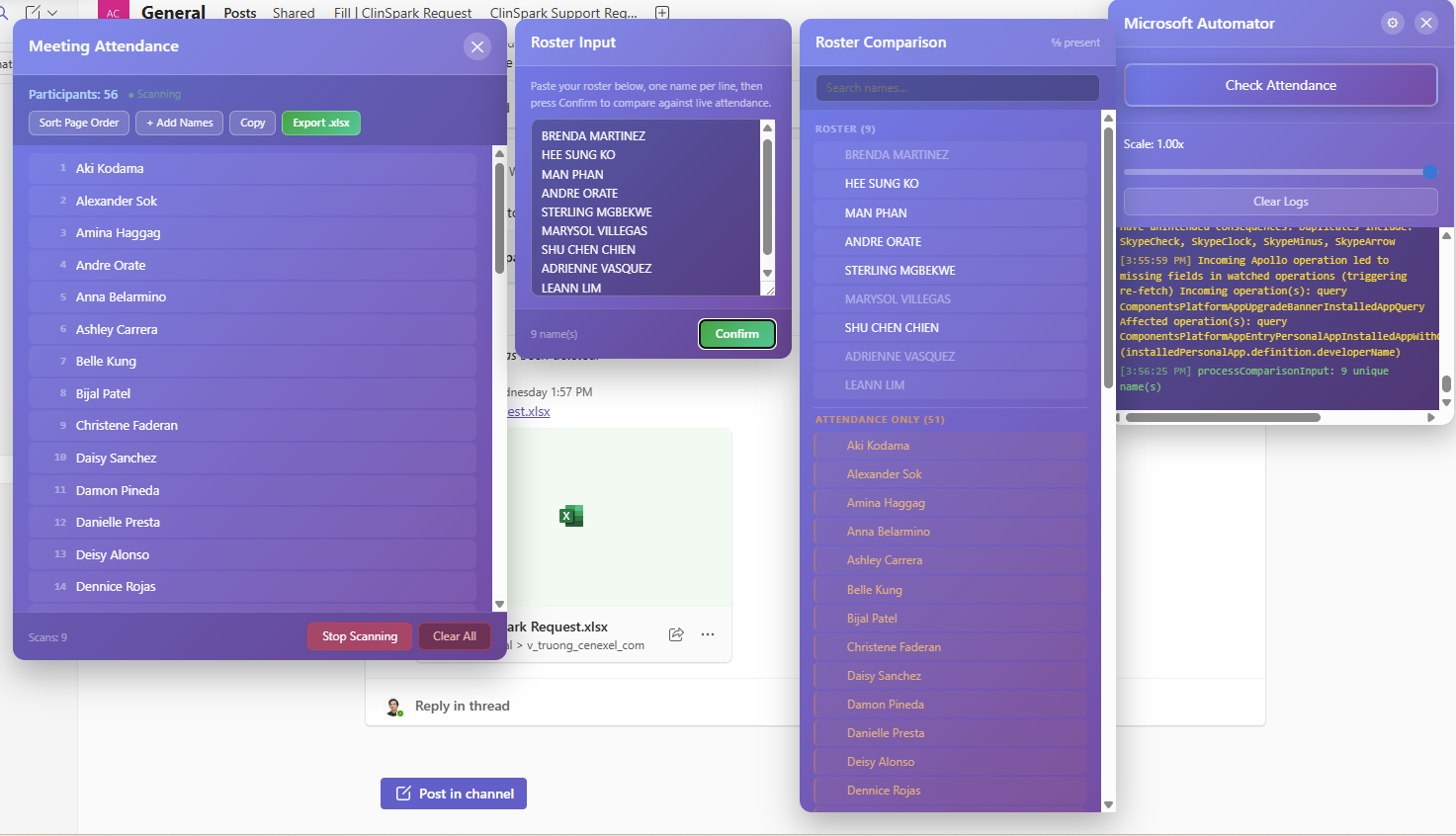
Targets Microsoft Teams (teams.microsoft.com). Automates meeting attendance tracking during live sessions.
- Polls the participant panel at a configurable interval and records each attendee's first-seen timestamp
- Tracks join order (page order) alongside alphabetical name for flexible reporting
- Floating GUI with log output, sortable participant list, and scan counter
- Configurable keyboard shortcut to toggle the panel
- Persists GUI visibility and scale preferences via
localStorage
ClinSpark — Core Engine
Core Automation Engine
- Floating control panel with start/pause/stop controls
- State machine persisted across page reloads via localStorage
- Configurable delays between actions for platform stability
- Activity log panel showing real-time progress and errors
- Draggable, collapsible UI with scalable dimensions
Form Automation
- Automatic field population from collected data
- Multi-step navigation: open form, fill fields, save, return
- Handles dynamic form elements loaded via AJAX
- Calculated fields: averages, medians, differences, BMI, QTcF
- Protocol-specific edit checks and validation triggers
Barcode Integration
- Subject identification via barcode scan input
- Automatic subject lookup and context switching
- Sample tracking with accession number generation
- Informed consent barcode verification workflow
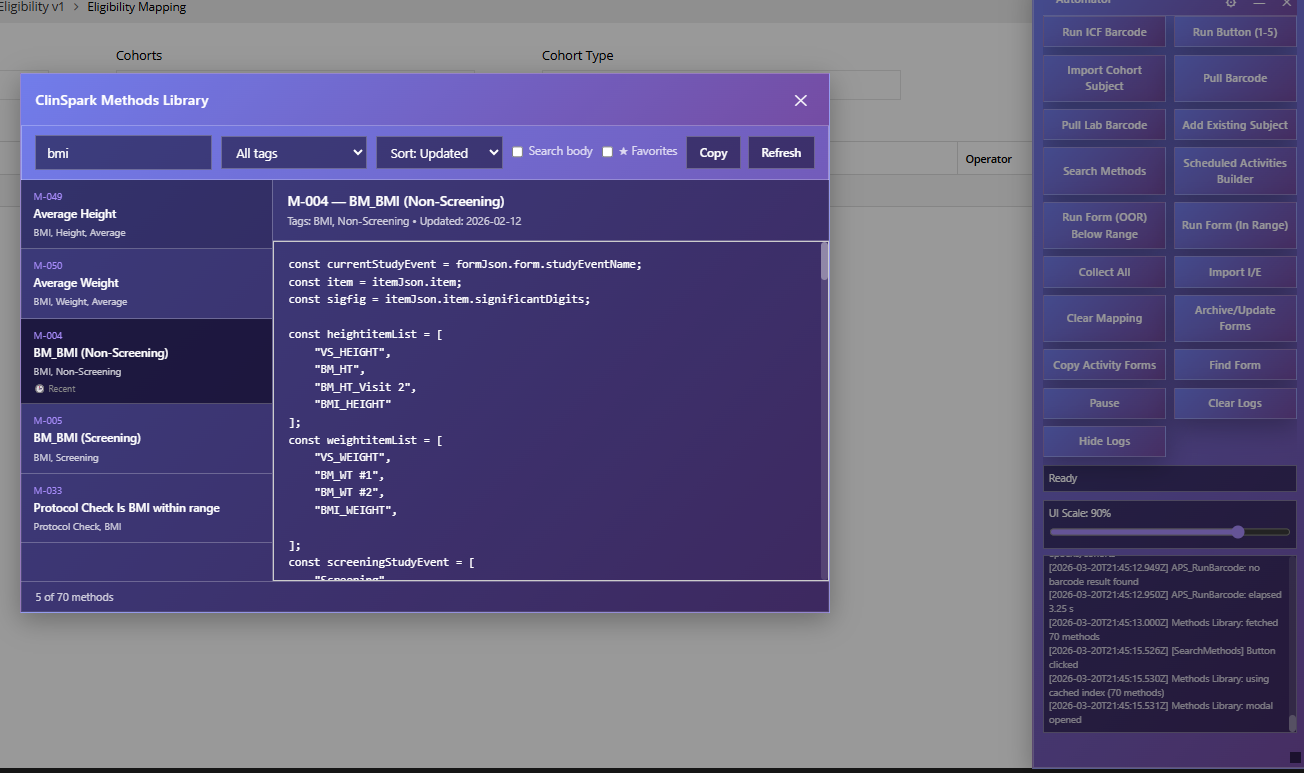
Method Library
- 85+ documented calculation and validation methods for clinical data
- Methods for vitals, ECG, lab panels, dosing checks, edit checks, and date windows
- Reusable across different study protocols and shared across scripts
- Markdown documentation and a JSON index for discovery and updates
Tech Stack
Screenshots
Challenges & Solutions
- Page reload persistence (ClinSpark): The clinical platform uses full-page navigation for many actions. I built a localStorage-based state machine that survives reloads and resumes automation at the correct step.
- Dynamic DOM elements: Forms and lists are loaded asynchronously via AJAX. The scripts use MutationObserver patterns and configurable retry delays to wait for elements before interacting.
- Virtual scroll viewports (Florence): Florence eBinder renders log entries in an Angular CDK virtual scroll container — only visible rows exist in the DOM. I implemented a progressive scroll-and-scan loop with
aria-busydetection and retry logic to ensure every entry is seen before marking the scan complete. - Teams DOM instability (Microsoft): Microsoft Teams' React-rendered DOM can re-mount the participant panel during navigation. I used a re-parent observer and debounced initialization to re-attach the GUI whenever Teams rebuilds its component tree.
- Platform updates: Target platforms update their UI periodically. Using semantic selectors (labels, data attributes, ARIA roles) rather than fragile CSS class paths improved resilience across versions.
- Error recovery: Network timeouts and unexpected modal dialogs required a pause-and-retry mechanism with clear user feedback through the log panel.
Outcomes & Impact
- Reduced daily ClinSpark data-entry time by approximately 60–70% for routine study workflows.
- Eliminated transcription errors in calculated fields (BMI, blood pressure averages, QTcF).
- Florence eLog sign-offs that required individually clicking through every log entry now run automatically in the background.
- Meeting attendance tracking in Teams, previously done manually, is now captured with exact first-seen timestamps and exportable join-order lists.
- 85+ reusable calculation and validation methods documented in Markdown and indexed in JSON for team reference.
- Scripts are self-updating via raw GitHub URLs, keeping all users on the latest version.
- Florence Automator userscript logic migrated to a Manifest V3 browser extension for cleaner lifecycle management.
- Adopted by multiple team members across different study protocols and platforms.
Lessons Learned
- Browser automation at the DOM level requires defensive coding at every step — never assume an element exists or is in the expected state.
- Clear logging is essential: when processing 50 subjects in sequence, users need to see exactly where things stand and what (if anything) failed.
- Documenting each calculation method in plain language (not just code) made it far easier for non-developers to verify correctness.
Future Improvements
- Configuration UI for per-study method selection instead of code-level customization.
- Expand the browser-extension pattern to ClinSpark Automator and Microsoft Teams Automator.
- Export of automation logs to CSV for audit trail documentation.
- Dry-run mode that previews all actions without executing them.